
ArtInChip D125CCS Minimal System Development Board
The UltraSemi ArtInChip D125CCS Minimal System Development Board provides basic buttons, status indicators and breakout pins around the D125CCS controller. It is intended for board bring-up, button and LED control, and peripheral prototyping for display, camera and other applications.
Board Photos and Pin Labels
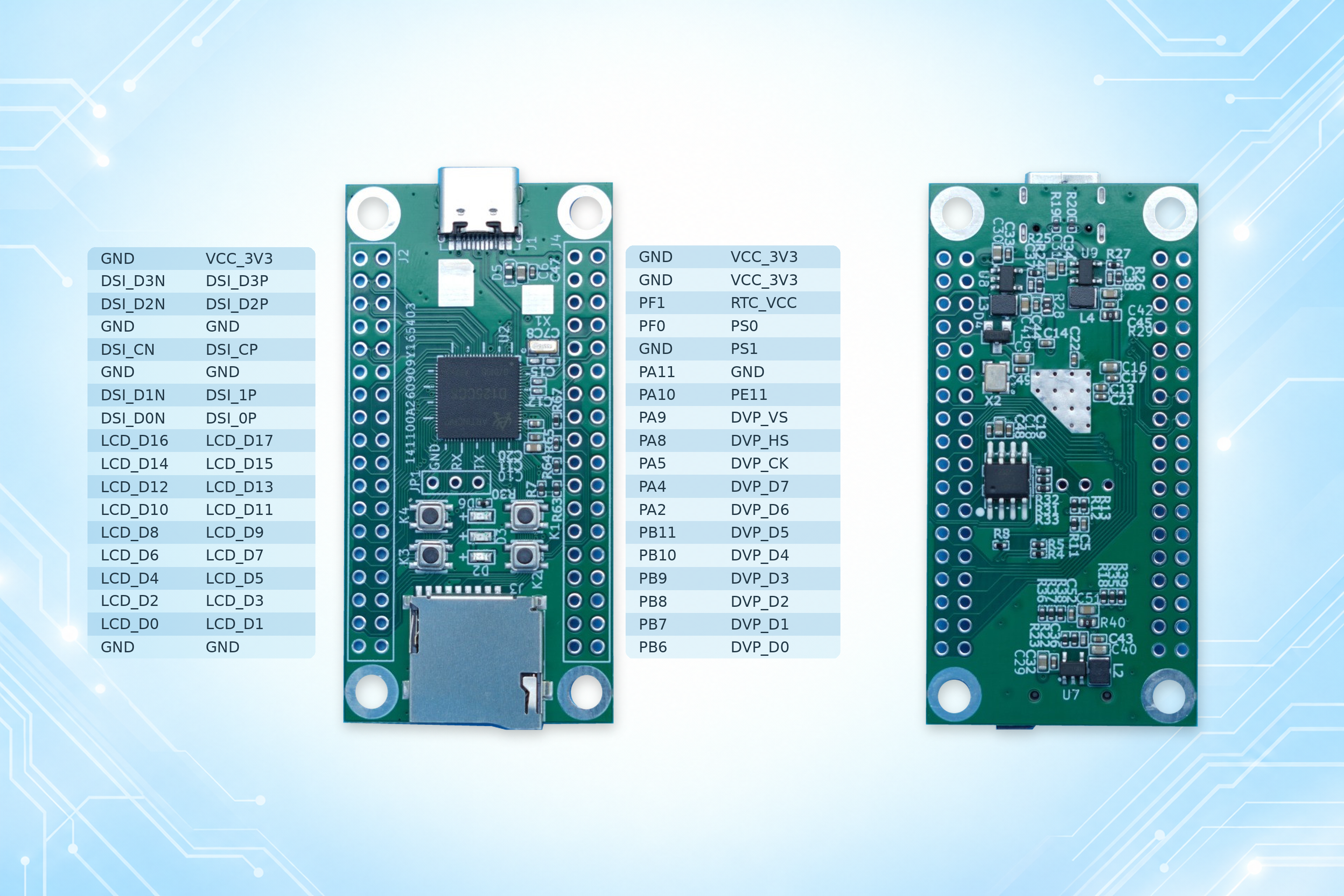
The image shows both sides of the board and the breakout pin labels. Click it to view the original. A USB-C connector, memory card slot and UART debug pads are visible; their supported functions depend on the hardware design and firmware configuration.
Hardware Configuration
| Item | Configuration |
|---|---|
| Controller | ArtInChip D125CCS |
| Reset button | 1 |
| BOOT button | 1 |
| User buttons | 2, with application-defined functions |
| Power indicator | 1 power LED |
| User indicators | 2 user LEDs for application status or debugging |
| Pin breakout | Other pins exposed through pads along both sides for external circuits |
| Hardware design files | KiCad schematic and PCB project, plus a 4-page PDF schematic; version 2026-10-28 |
Expansion and Development Uses
The illustrated pin labels include DSI, LCD, DVP, GPIO, power and ground signals, providing a starting point for peripheral adapters and expansion circuits. Display and camera functions require suitable pin multiplexing, external circuitry and software drivers. Verify the usable combinations against the hardware design.
- Basic interaction: use the two user buttons and two user LEDs to develop input handling, events and status feedback.
- Boot and board debugging: use the reset button, BOOT button and debug interface when working on boot sequences and firmware.
- Peripheral prototyping: connect exposed signals to prototype display, camera or general-purpose I/O circuits and adapt their drivers.
Hardware Design Files and Schematic Preview
These files correspond to D125CCS_DEMO_20261028, with the file version marked 2026-10-28.
| Resource | Contents | Access |
|---|---|---|
| KiCad project | Project file, PCB, top-level schematic and D125CCS, SCREEN and USB_POWER subsheets | Download KiCad project ZIP |
| PDF schematic | 4 pages of circuit diagrams, viewable without KiCad | Open PDF in a new window · Download PDF |
Preserve the directory structure when extracting the ZIP, then open D125CCS_DEMO_20261028.kicad_pro. Before connecting expansion circuits, check power, signal levels, pin orientation and multiplexing against the schematic for the relevant revision.
Embedded PDF Schematic
If the preview is unavailable in your browser, use the open or download links above.
Related Boards and Development References
- ArtInChip D125 Zephyr 5.5-inch MIPI Display Bring-up Board: another board focused on display bring-up.
- Zephyr ArtInChip Build Guide: a related platform application build reference; hardware adaptation is required for this board.