
C5122 UVC to HDMI Solution
UVC to HDMI converts a video stream from a device supporting USB Video Class into an HDMI video signal. UltraSemi's solution uses the C5122 SoC and its integrated hardware decoding capability to receive UVC video and output it to a monitor, television, projector or video production device, supporting 1080p at 60 Hz output.
The converter handles video input, decoding and display output independently. No computer host or camera driver installation on a computer is required, making it suitable for connecting USB video devices directly to an HDMI display chain.
Solution Specifications
| Item | Description |
|---|---|
| Controller platform | C5122 SoC |
| Conversion direction | UVC video input → HDMI video output |
| Input devices | USB cameras, cameras, handheld gimbal cameras or capture devices operating in UVC mode |
| Decoding | Integrated SoC hardware decoding |
| Video output capability | 1080p at 60 Hz |
| Operation | Standalone hardware without a computer host |
| Driver requirements | No computer driver installation; compatible devices use matched video modes |
| Receiving devices | HDMI monitors, televisions, projectors or compatible video production switchers |
1080p60 describes the solution's output capability. Actual input and output behavior depends on the source format, resolution, frame rate and the receiving device's supported modes. UVC devices may differ in encoding and controls, so confirm compatibility with the intended device for each project.
Key Features
USB Video on HDMI Displays
Connect a USB camera or UVC source to an HDMI display without using a computer for capture, preview and retransmission. This supports standalone monitoring and presentation products.
C5122 Hardware Decoding
The C5122 SoC performs decoding and output as an independent hardware conversion chain. Adapted UVC devices can connect using their corresponding operating modes, supporting integration into products or fixed display installations.
1080p at 60 Hz Output
The solution supports 1080p60 HDMI output for Full HD monitoring and display integration. Smoothness and latency for a specific device require testing with its input format and the complete signal chain.
Typical Applications
Large-Screen Monitoring for DJI Pocket and Portable Cameras
Convert video from a device supporting UVC output to HDMI for a monitor or production switcher. Pocket 3 has project-reported compatibility results. Other models, including Pocket 2 and Pocket 4, require separate confirmation of UVC output and converter compatibility; Pocket 3 results do not establish compatibility for them.
For longer display connections, evaluate a suitable extension device after the HDMI output and test the complete chain at the target distance and video mode.
USB Camera, Microscope and Endoscope Displays
Connect a USB camera, microscope or endoscope operating in UVC mode to a television, monitor or projector for observation, teaching and equipment monitoring. An endoscope camera has reported compatibility results; other specific models can be evaluated individually.
Video Production and Multicamera Inputs
Convert a UVC source into an HDMI input for a production switcher as one source in a multicamera workflow. For ATEN or other switching equipment, confirm HDMI input timing first; a brand reference does not establish validation of every model.
Device Compatibility Feedback
The following results were supplied by the project. OK applies to the tested unit and configuration, not every device from the same brand. Exact models, firmware versions, UVC modes and tested timings can be confirmed during project evaluation.
| Device or category | Project feedback | Scope |
|---|---|---|
| Sony camera | OK | Confirm the specific model and connection mode |
| DJI Pocket 3 | OK | Use the tested device's UVC mode |
| ITE capture device | OK | Confirm the specific implementation and output mode |
| Endoscope camera | OK | Applies to the tested UVC device |
| MS capture device | OK | Confirm the specific model and UVC video mode |
Product Images and Connection Diagram
Product Images
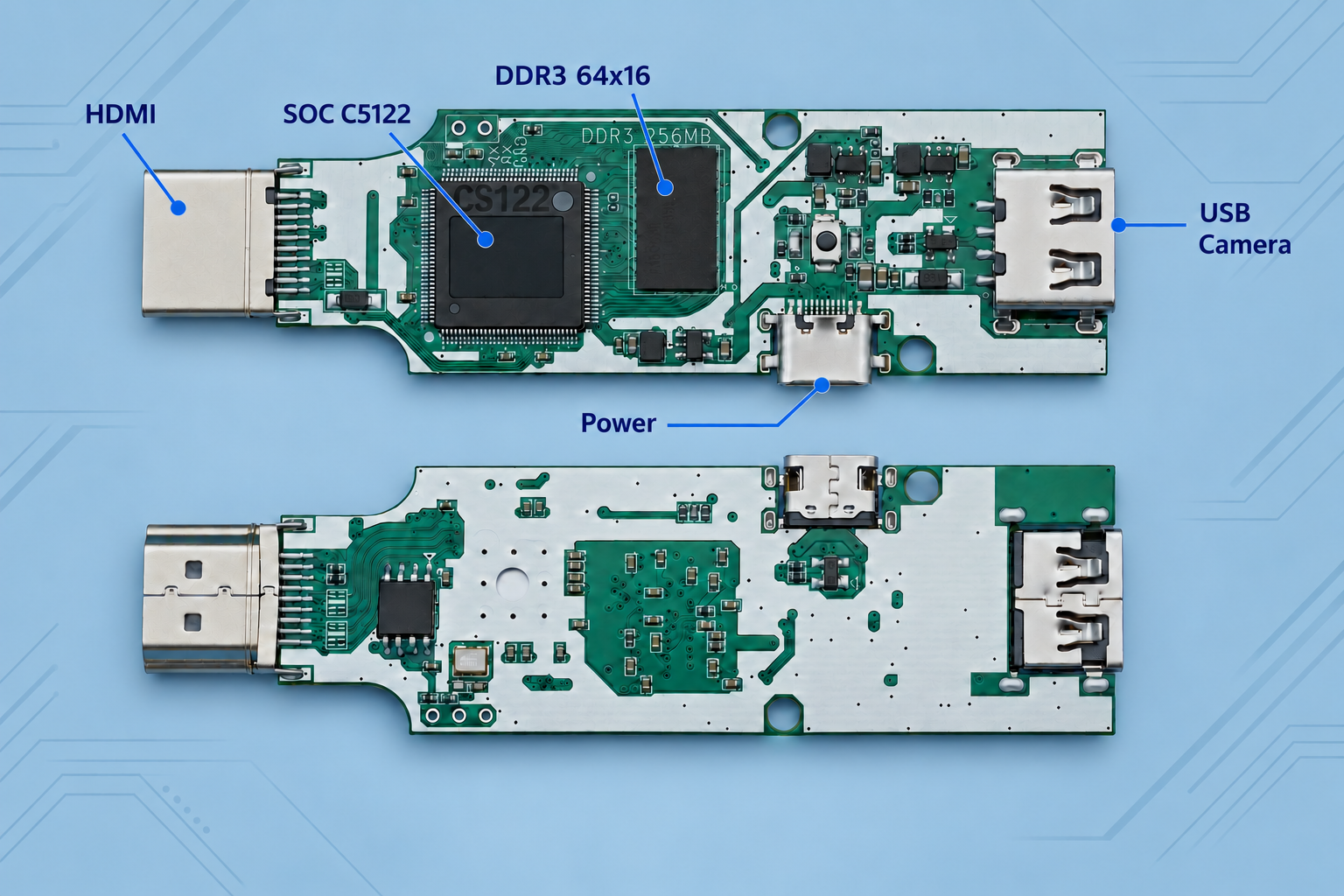
The product image shows both sides of the board: HDMI output at one end, a USB-A camera input at the other, and a USB-C power connector on the side. Distinguish the camera input from the power connector when wiring.
The product image identifies the SoC as C5122. Memory specifications depend on the fitted components and corresponding hardware revision.
Connection Diagram
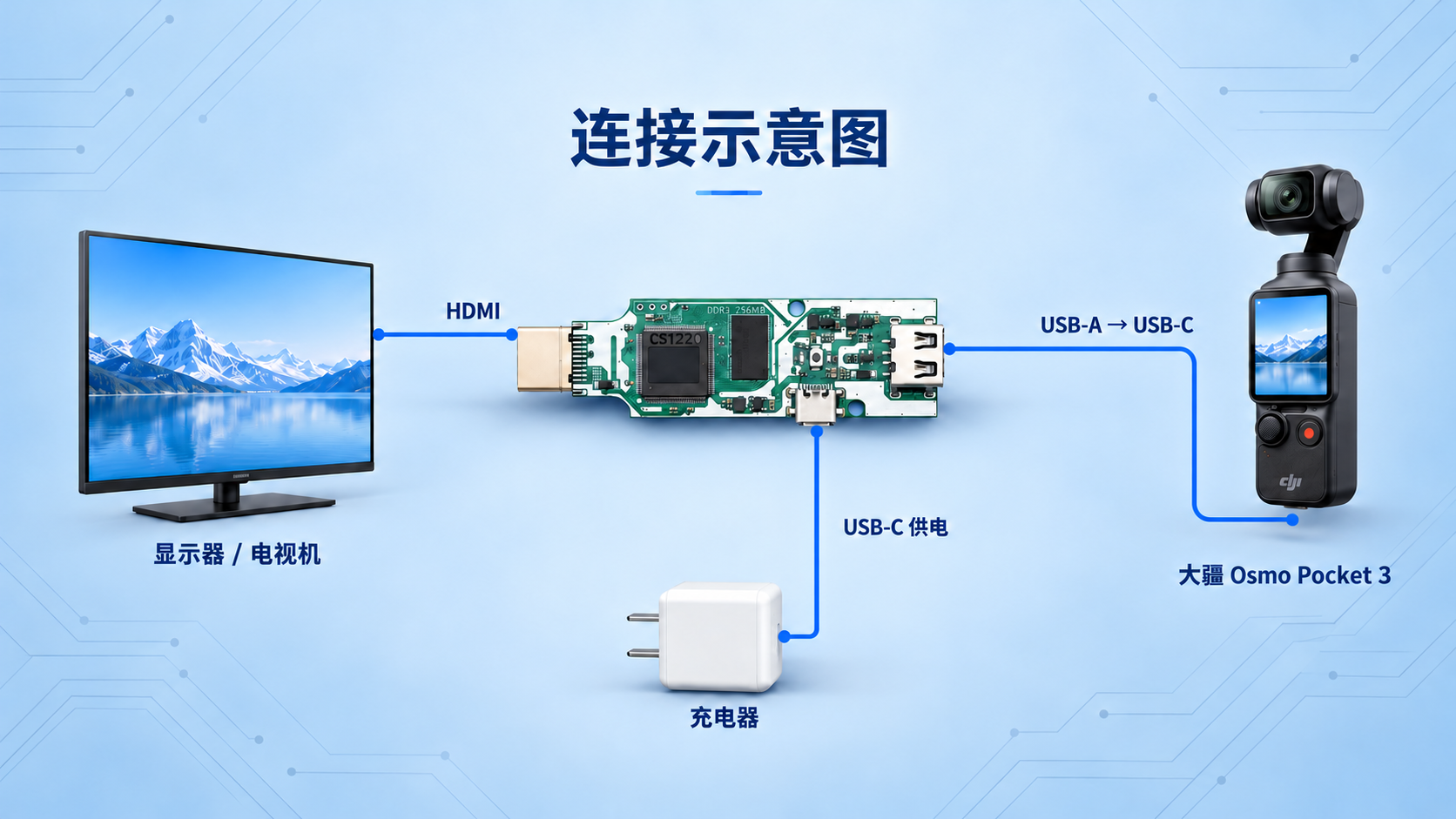
Using DJI Osmo Pocket 3 as the example, the signal path is UVC source → converter USB input → HDMI display. The converter is powered separately through the side USB-C port.
| Connection | Wiring |
|---|---|
| Video input | Connect Pocket 3 USB-C to the board's USB-A camera input using a USB data cable, and put the source in UVC mode |
| Video output | Connect the board's HDMI output to a monitor, television or compatible production device |
| Board power | Connect a power source to the side USB-C power port; confirm the required supply specifications for the actual hardware |
Select the corresponding HDMI input on the receiving device. Other UVC cameras and capture devices follow the same signal direction, with cables and video modes matched to the specific device.
Frequently Asked Questions
Can any USB connection be converted to HDMI?
The source must provide a UVC-compliant video stream. A USB connector used only for charging or file transfer does not establish UVC video output support.
Is a computer or driver installation required?
The converter handles video input, hardware decoding and HDMI output independently. No computer host or computer driver installation is required. The source must still enter its supported UVC operating mode.
Will HDMI output always reach 1080p at 60 Hz?
The solution supports this output mode, but the source frame rate, video format and display support must be confirmed. Output capability does not establish the capture capability of every connected device.
Discuss Your Project
Contact UltraSemi at doc@ultrasemi.com to evaluate USB camera to HDMI conversion, Pocket 3 monitoring or HDMI output from UVC capture devices.
Include the source brand and model, firmware version, UVC format, target resolution and frame rate, monitor or switcher model, power requirements and enclosure constraints to help establish compatibility scope.