
MS9129 5.5-inch Desktop Display Solution
A desktop secondary-display reference design based on MS9129 (MacroSilicon USB 2.0 → MIPI). The unit uses a 5.5-inch 720 × 1280 panel as a USB information / monitor screen, mountable in portrait or landscape. It can also work as a standard USB Display, with Windows, macOS, and Android support. Host-side Python themes render HUD-style system telemetry for desk status, gaming peripherals, and lightweight dashboards.
Materials, purchase, and support
IC details: MS9129 / USB Display series. Drivers: USB Display drivers. Sample purchase, source code, and setup steps are below.
1. Sample purchase
2. Product showcase
The same 5.5-inch panel fits portrait and landscape shells for upright or sideways desk placement; multiple shell colors available.
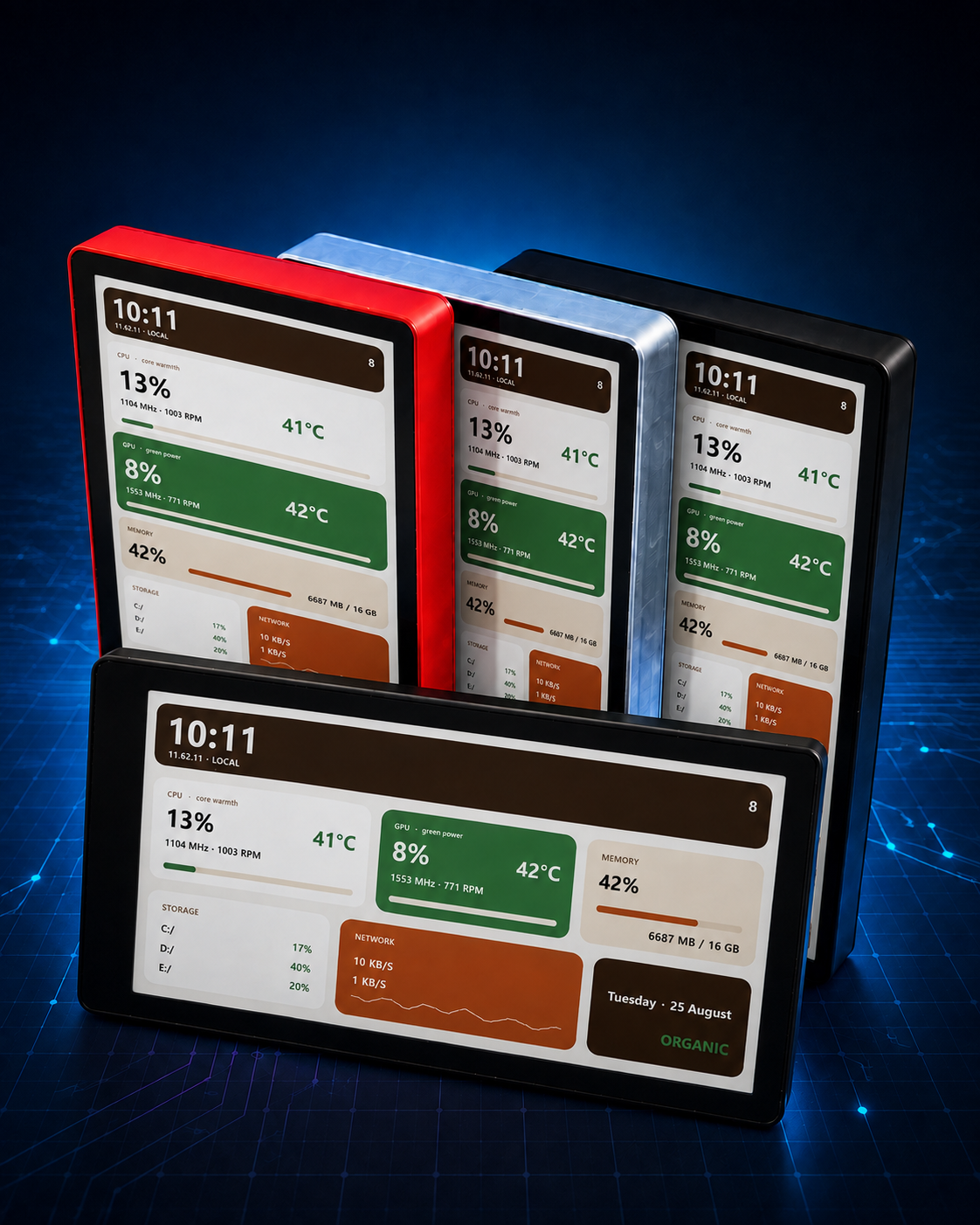
Portrait unit

Landscape unit

3. Setup guide
- Connect the display to the PC with a USB cable.
- Download and install the MacroSilicon USB Display driver for Windows 10/11. After install, the panel can work as an extended / duplicated display. More builds and OS notes: USB Display drivers.
- Install the UsbDisplayHud app to use it as a desktop secondary screen / photo album (HUD themes or slideshow). Use the packaged build or run from source:
- Build your own themes: add Python templates under
themes/with your layout and resolution. Seethemes/README.txtin the repository.
4. Secondary-display host app
This design can be used as a USB Display secondary screen. Host platforms: Windows, macOS, and Android. Install the matching driver / client first — packages and steps: USB Display drivers.
USB Display HUD covers style-template selection, placement orientation (0° / 90° / 180° / 270°), live preview, start-on-boot, and modes such as photo slideshow.
Portrait theme mode
Theme list plus portrait live preview (example: Natural Organic).

Landscape theme mode
Same theme previewed for 90° / 270° landscape placement with orientation controls.

Photo slideshow mode
Pick an image folder, interval, and playback mode; the right pane shows the slideshow preview.

5. Python theme previews
Themes are implemented in Python, covering system-monitor HUD layouts (CPU / GPU / memory / network / clock, etc.), including Natural Organic and Anime Pink styles. Portrait and landscape summary previews; source and theme files live in pyusbdisplaydemo.
Anime Pink style
Anime-inspired pink HUD: soft pink–purple gradients, rounded info blocks, and system telemetry (CPU / GPU / memory / network / clock). Suited to portrait desk display. Select Anime Pink in the UsbDisplayHud theme list to preview and stream.
Portrait theme overview

Landscape theme overview

6. Specifications
| Item | Detail |
|---|---|
| Core IC | MS9129 (USB 2.0 Device → MIPI) |
| Panel size | 5.5 inch |
| Resolution | 720 × 1280 (native portrait; landscape via theme / rotation) |
| Host link | Dual USB-C; auto-detects the connected port for portrait or landscape placement |
| OS support | Windows, macOS, Android (USB Display) |
| Software | Python HUD themes; USB Display HUD host app (themes / photo slideshow) |
| Hardware open source | KiCad schematic / PCB (MS9129_USB2MIPI_20260730); enclosure .3mf |
7. Hardware and enclosure

The board carries MS9129 plus power, Flash, buttons, and USB-C; the panel connects over FPC to MIPI. Dual USB-C eases power/data and mechanical routing.
Design files (KiCad)
Schematic and PCB are KiCad projects, including MS9129, MIPI out, power sheets, and BOM:
| Asset | Notes |
|---|---|
| Schematic | MS9129_USB2MIPI_20260730.kicad_sch and sheets |
| PCB | MS9129_USB2MIPI_20260730.kicad_pcb |
| Project / BOM | .kicad_pro, BOM.xls |
Enclosure 3D print
8. Downloads
| Asset | Link |
|---|---|
| Hardware design (KiCad) | MS9129_USB2MIPI_20260730.zip |
| UsbDisplayHud 0.03 | UsbDisplayHud-0.03.zip |
Enclosure 3D print (.3mf) | ms9129-desktop-display.3mf |
| USB Display driver (Windows 10/11) | MacroSilicon-USBDisplay-Driver-…V4.2.16.26.exe |
| Driver / client overview | USB Display drivers |
| Host app / theme source | UltraSemiCN/pyusbdisplaydemo |
| Taobao sample | Purchase link |
| MS9129 IC page | MS9129 |
| USB Display series | USB Display |