
ArtInChip D125 Handheld Thermal Imaging Solution
Based on the ArtInChip D125, this solution combines thermal image display and recording in a handheld device. It supports photo capture, video recording, and image rotation for on-site observation and saving images or video for later review.
The display resolution is 720 × 1280, with an optional touchscreen available to suit project requirements.
1. Solution overview
The handheld device combines a thermal imaging module, a D125 controller, and a display to support both observation and recording. Users can capture individual photos, record continuous video, or adjust the image orientation as needed on site.
| Item | Description |
|---|---|
| Controller platform | ArtInChip D125 |
| Form factor | Handheld thermal imaging device |
| Display resolution | 720 × 1280 |
| Optional feature | Touchscreen |
| Display | Thermal image preview |
| Photo capture | Capture and save thermal images |
| Video recording | Record continuous thermal imaging video |
| Rotation | Rotate the image for viewing in different orientations |
2. Key features
Photo capture
Capture and save thermal images observed on site. Photos preserve the view of a target or location for later review and comparison.
Video recording
Record thermal imaging video to capture changes over time. Continuous video allows users to review the observation process beyond a single snapshot.
Image rotation
Rotate the thermal image to match the device's viewing orientation, making handheld observation and framing more convenient.
3. Prototype demonstration
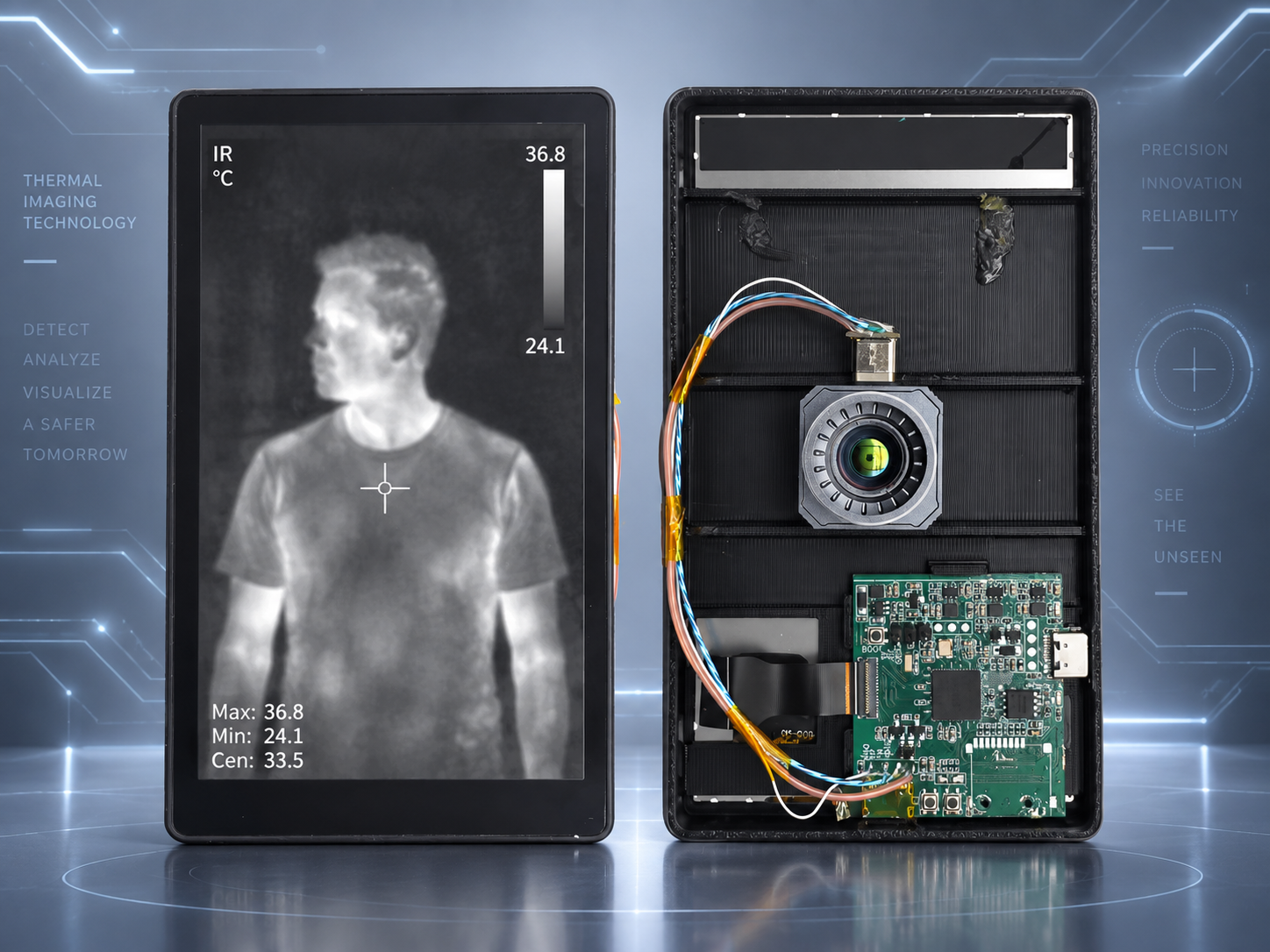
The prototype integrates a display and a thermal imaging module. The front shows the thermal image, while the rear view reveals the imaging module, controller board, and connecting cables.
The demonstration interface uses a grayscale thermal image with a center crosshair, a temperature scale, and maximum, minimum, and center-point temperature readings to help users interpret the temperature distribution in the image.
4. Workflow
- Point the device at the target and observe the thermal image on the screen.
- Use image rotation to adjust the image orientation for viewing.
- Use photo capture to save an individual image.
- Use video recording to save a continuous observation sequence.
5. Contact
For details about the ArtInChip D125 handheld thermal imaging solution, contact doc@ultrasemi.com.
Please include the thermal imaging module model, target display specifications, photo and video recording requirements, device dimensions, and power requirements to help define the project configuration.